iNet 3
 Product Type: Transcribe Software
Manufacturer: Digital Accessories Corporation (DAC)
Product # VSINET
iNet 3 is a software transcription solution and works with the Voice Solution Phoenix dictation system.
With its user-friendly interface and video tutorials, iNet 3 is easy to learn and integrate into your existing infrastructure. Whether on the local network, through a VPN, or over the internet, iNet provides complete mobility when it comes to transcription. Your data is encrypted and user profiles have adjustable access permissions to ensure that company or HIPPA security policies are met.
iNet 3 is also Dragon Speech Recognition compatible! Enjoy the power of the world's most popular speech recognition solution with one of the world's most user-friendly transcription solutions!
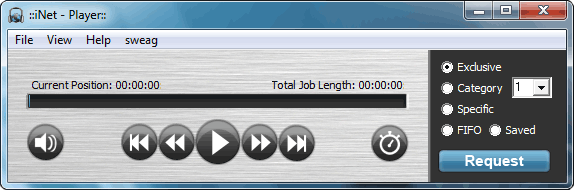
Main screen when iNet 3 is first opened.
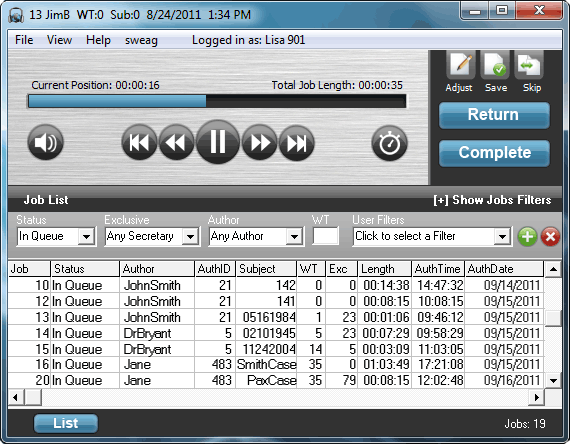
iNet 3 when a dictation has been opened. The Job List is expanded here and all available audio files with their demographic data is shown.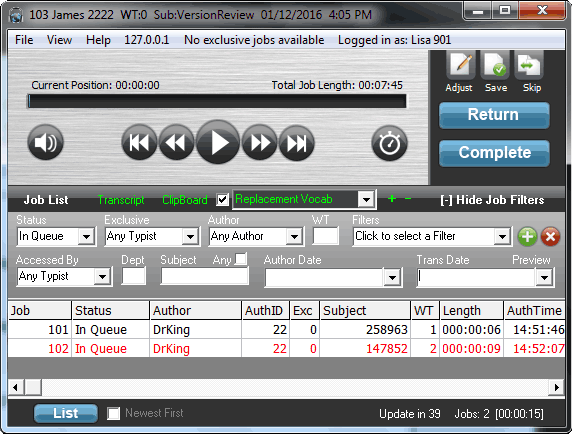
iNet 3 when a dictation has been opened. The Job List is expanded here and all available audio files with their demographic data is shown.
Product Details Package Contents:
iNet 3 Software CD
USB Foot Control
Stereo 3.5 mm Headset
User Manual (PDF)

Learn More
Product Type: Transcribe SoftwareManufacturer: Digital Accessories Corporation (DAC)
Product # VSINET
Overview
iNet 3 is a software transcription solution and works with the Voice Solution Phoenix dictation system.
With its user-friendly interface and video tutorials, iNet 3 is easy to learn and integrate into your existing infrastructure. Whether on the local network, through a VPN, or over the internet, iNet provides complete mobility when it comes to transcription. Your data is encrypted and user profiles have adjustable access permissions to ensure that company or HIPPA security policies are met.
iNet 3 is also Dragon Speech Recognition compatible! Enjoy the power of the world's most popular speech recognition solution with one of the world's most user-friendly transcription solutions!
Main screen when iNet 3 is first opened.
iNet 3 when a dictation has been opened. The Job List is expanded here and all available audio files with their demographic data is shown.
iNet 3 when a dictation has been opened. The Job List is expanded here and all available audio files with their demographic data is shown.
Key Features
- Type from home, a different office site, or even out of the country
- Dragon Speech Recognition compatibility
Directly from the iNet, typists can create on the fly substitutions of proper name misspellings and common Dragon errors with our Replacement Vocabulary feature. Those corrected documents can then be pushed back to Dragon for later learning. - Complex Dragon macros made easy
This allows the author to state commands like "Standard Reminder Mr Jenkins next field January newline" and move on while Dragon and iNet do all the work on the backend. (Ex. Hello Mr Jenkins, it was so nice to visit with you in January. Our records show...") - Search filters
Quickly find the dictation you need with a variety of filters. Filters can even be saved for future use. - Custom productivity reports
Improve your workflow with in-depth productivity reports. Or use the reports for payroll and billing. - Centralized administrative control
User permissions, workflow management, demographic information, and more all from the Phoenix Enterprise server
- Exporting for backup or archival
iNet makes file backup or archival simple with exporting that can be configured server side. All it takes is two clicks to export!
Benefits
 |
More Options: Type from home, another office, or anywhere with an internet connection |
 |
Go Digital: Stop repairing old cassette solutions and buying replacement tapes |
 |
Automate: Easily create productivity reports, route dictation, and export audio all with a click |
Product Details Package Contents:
iNet 3 Software CD
USB Foot Control
Stereo 3.5 mm Headset
User Manual (PDF)
+ Specifications
Foot Control Interface
USB 2.0
Licensing
Yes. Product key embedded into foot control's ROM.
+ Minimum System Requirements
OS Supported
Microsoft® Windows® XP
Microsoft® Server 2003 (32-bit)
Microsoft® Windows Vista™(32-bit & 64-bit)
Microsoft® Server 2008 (32-bit & 64-bit)
Microsoft® Windows 7 (32-bit & 64-bit)
Microsoft® Windows 8 (32-bit & 64-bit)
Microsoft® Server 2003 (32-bit)
Microsoft® Windows Vista™(32-bit & 64-bit)
Microsoft® Server 2008 (32-bit & 64-bit)
Microsoft® Windows 7 (32-bit & 64-bit)
Microsoft® Windows 8 (32-bit & 64-bit)
Processor
Intel® Pentium® 4 (or AMD equivalent)
Memory
1GB (1.5GB for Microsoft Windows Vista, Server 2008, or 7)
Hard Disk Space
20MB
Optical Drive
CD-ROM
Display
1024 x 768 pixels, 65k colors
Additional Requirements
Sound Card
1 Powered USB Port
1 Powered USB Port
 |
|
|
| iNet 3 Brochure | iNet 3 User Guide | iNet 3 Quick Start Guide |
Call for pricing
 In Stock


